
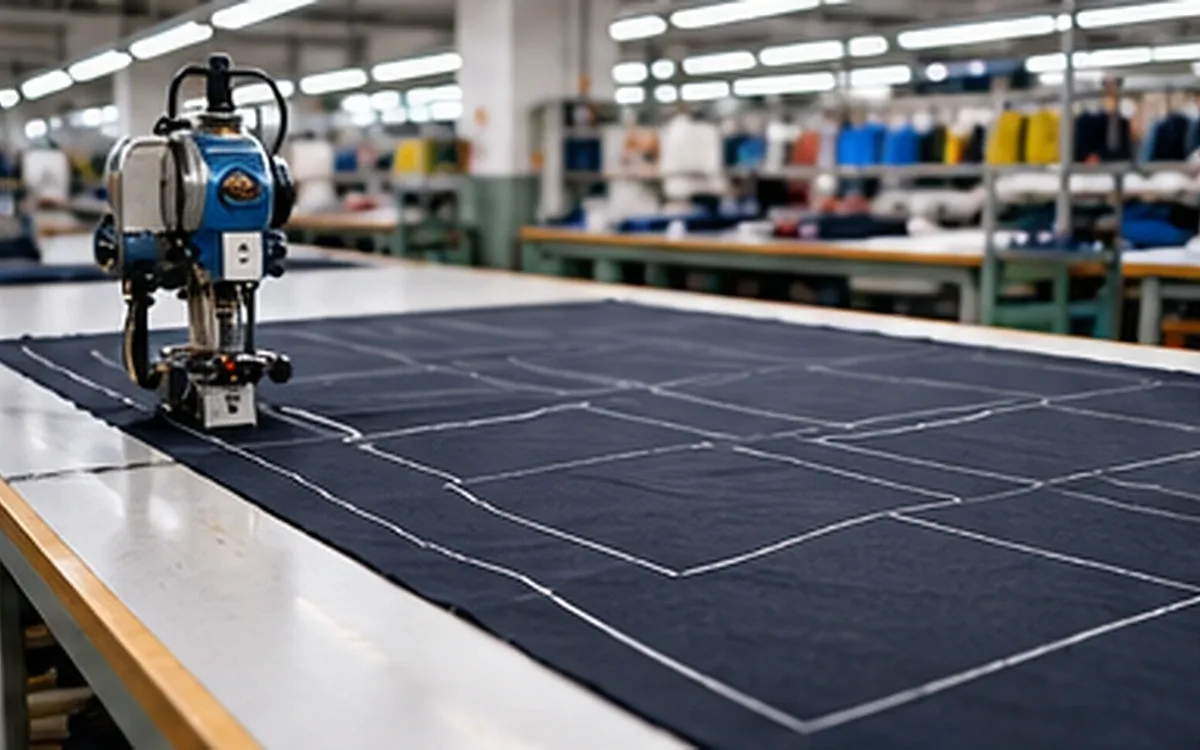
A cutting job can use the right style name and still cut the wrong parts. The marker may contain an earlier pattern revision. A line meant for marking may be treated as a cut. A repeat setting may double the required output. None of these errors needs a broken machine.
The apparel CAD CAM workflow must carry the approved design through to the cut bundle. Computer-aided design, or CAD, defines and develops the pattern. Computer-aided manufacturing, or CAM, uses that data to prepare or control physical work. In the cutting room, the handover needs more than a file that opens.
This guide follows that handover through a fictional waist-apron job. It focuses on release checks, quantity logic and traceable changes. The examples do not prescribe cutter settings or replace the instructions for a particular machine.
Follow the job through four different records
Separate the approved pattern, the marker, the cutting file and the job instruction. They may be linked within one software package, but each answers a different question.
The pattern defines the intended pieces, sizes, grainlines and other features. Its approval concerns a stated revision and scope. Approval of fit does not, by itself, confirm the cutting quantity or material lot.
The marker places the required pieces within a defined material width and length. It reflects a size mix, placement rules and material constraints. A marker can contain several garment sets while using the same piece definition many times.
The cutting file carries data prepared for the chosen cutting route. It may contain contours, tool assignments, sequence information or other machine-related data. Its exact content depends on the system and format. AccuMark's Generate Cut Data help, for example, describes creating cut data from the active marker. The selected marker therefore matters.
The job instruction connects that file to the order and the chosen material and colour. It also states the ply count and planned repetitions. This tells the cutting team what physical job to run. The file may have the right shapes while the instruction calls for the wrong material or twice the needed output.
Give each record an identity and retain their links. A filename such as “final_new_latest” gives little useful information. It does not link the approval to the marker and machine setup. Use the site's naming system and include the revision in the release record.
Establish what has actually been approved
Start with the approved pattern revision and its piece list. Check these before generating production data. Check the size range, material assignment and any agreed shrinkage treatment. Resolve missing cutting quantities or unclear pair requirements at this point.
The pattern maker owns the geometry decision. The marker maker checks the placement rules and applies them to those shapes. The cutting team confirms the material and machine job. Each role needs a clear way to return a question to the previous owner.
For our example, release R07 covers a simple waist apron in sizes S and L. Each apron uses one body, one pocket and two ties from the same shell fabric. The pattern includes its intended hem and seam allowances. There is no lining or separate interlining in this teaching model.
The release record states that both ties use the same approved shape. That detail prevents the software operator from treating one tie definition as one physical tie per apron. A definition is reusable data; a cutting quantity is a requirement.
Retain the approval note alongside the pattern record. If the buyer approved only a fit change, check whether other release conditions remain open. ApparelDiary's apparel PLM guide explains how specifications, changes and approvals can be linked. The cutting release should point to those records rather than rely on memory.
Confirm the meaning of the exchange file
Ask the receiver which format and version it needs. Confirm how the file represents cut boundaries, seam lines, notches, internal marks and size information. A familiar extension does not describe every detail inside the file.
Historical format names also need context. ASTM's public listing for D6673-10 describes pattern-piece and grade-rule exchange. It explicitly excludes numerical cutter instructions and complete marker or spreading information. The standard was withdrawn in 2019 with no replacement listed. Software may still support an ASTM-style exchange profile. Check that data route in the receiving system. Its label does not establish a current cutting standard.
Import into the intended receiving system and inspect the result there. An export log proves that the sender created a file. It does not show how the receiver understood it. Keep the original export unchanged while investigating any fault.
Use geometry checks that reveal different errors
Check a known length in each main direction. Suppose the approved control distances are 400 mm horizontally and 250 mm vertically. The receiving file shows 400 mm and 254 mm.
Horizontal factor = 400 ÷ 400 = 1.000.
Vertical factor = 254 ÷ 250 = 1.016.
The vertical distance is 1.6% larger, while the horizontal distance is unchanged. This is not a uniform scale change. Review the transfer settings and any earlier transformation. Applying one general scale factor would not correct both measurements.
These are fictional control dimensions, not an acceptance tolerance. Choose actual checks that cover the garment's critical geometry. Include curves and key points as well as straight distances. Verify the measurement path so that a seam line is not compared with a cut edge.
Check that an allowance has not been added twice or stripped away. If shrinkage compensation is already built into the approved pattern, identify it in the release. The fabric shrinkage and pattern-allowance guide explains the material basis for that adjustment. A cutting operator should not resize approved parts to resolve an unexplained mismatch.
Translate line meaning into the right action
CAD drawings contain information that should not all become blade movement. A grainline, pocket position and seam guide may appear beside the outer cutting contour. Their visual similarity does not make their purpose the same.
AccuMark's internal-label documentation gives distinct labels to drill locations and internal mark points. It also separates grainlines, internal cut-outs and seam-allowance lines. Those labels are specific to that system. Other formats may carry the same purpose through layers, attributes or different codes.
Build a short action map for the actual exchange route. It should connect the source feature to the receiver's interpretation and the intended output. Check the map after import, where mistakes become visible.
Source feature | Intended treatment in this job | Check before release |
|---|---|---|
Outer cut boundary | Cut the approved outline | One correct contour, with no unintended gap |
Pocket placement mark | Use the approved marking method | It has not become an internal cut |
Grainline | Retain as placement information | Direction is preserved without unwanted cutting |
Notch | Apply the approved notch method | Type, position and physical result agree |
Text label | Identify the part or bundle | Text is not treated as a cutting contour |
The table is a review aid, not a universal machine code list. Some jobs need a physical drill mark; others use a different marking method. The product and material requirements must settle that choice. Do not let an import default choose it by accident.
Inspect duplicate entities and overlapping lines. Two coincident outlines can look like one line on screen. A repeated tool pass may become apparent only when the route is displayed or the file is processed. Check how the receiving software handles such entities before accepting the result.
Also distinguish a deliberately shared cut from an accidental overlap. Removing every repeated line without review can change the intended construction of the job. If the CAM system modifies the route, retain the resulting output and check the affected features again.
Reconcile pieces, garment sets, plies and repeats
Now apply the quantity requirements to the apron job. The marker holds three S aprons and two L aprons per ply. Each apron needs four physical fabric pieces: a body, a pocket and two ties.
The piece count in one marker placement is therefore:
Bodies: 3 + 2 = 5.
Pockets: 3 + 2 = 5.
Ties: (3 + 2) × 2 = 10.
Total placed contours: 5 + 5 + 10 = 20.
The marker represents five apron sets per ply. It does not represent 20 aprons. Nor does a single tie definition mean that only one tie contour should be placed.
For a planned lay of 24 plies, the expected cut quantities are:
Output from one lay | Calculation | Expected quantity |
|---|---|---|
Size S apron sets | 3 × 24 | 72 |
Size L apron sets | 2 × 24 | 48 |
Total apron sets | 5 × 24 | 120 |
Body panels | 5 × 24 | 120 |
Pocket panels | 5 × 24 | 120 |
Tie panels | 10 × 24 | 240 |
Total physical panels = 120 + 120 + 240 = 480.
This calculation assumes every planned piece is cut and usable. It is an expected output, not a count of accepted production. Damage, missing parts or a partial run must be recorded separately.
If the job is repeated for two identical lays, the totals become 144 S sets, 96 L sets and 240 apron sets. The panel total becomes 960. Check what the job interface's repeat field actually does. It might mean another whole lay, another marker section or a different local function. The word “repeat” alone does not define the multiplier.
Eastman's EasiSelect description gives a useful example. Its bill of materials tracks part quantities and material details. Order requirements are then expanded for nesting. That makes the source quantity record worth checking. Correct nesting cannot repair a wrong requirement supplied to it.
A total count can hide a wrong kit
Suppose all 480 planned panels are present, but 20 pockets were cut in the wrong size or revision. The overall panel total still matches. The number of complete approved kits may be lower.
Reconcile by part identity, size, revision and material where those differ. If ties are common to both sizes, make that relationship explicit. Keep separate release quantities for pockets that differ between sizes. A summary table may combine them for arithmetic, but it must not hide those differences.
Use actual good-part counts for the kit check. For each part, divide the good-part count by the number needed per apron. The lowest complete-set result limits the output for that size. Do not call a pile of panels complete garment sets until the required parts can be matched.
For example, a group intended for 72 S aprons contains 72 correct bodies, 70 correct pockets and 144 correct ties. It supports only 70 complete S kits. The two spare bodies and four spare ties remain identifiable parts, not two finished kits. This is a release and reconciliation check, not a reason to change the approved bill of materials.
Replace the missing parts without repeating the order
Carry that fault into the two-lay order. The first lay gives 70 complete S kits and 48 complete L kits. The second lay passes with its planned 72 S kits and 48 L kits.
Accepted S kits = 70 + 72 = 142.
Accepted L kits = 48 + 48 = 96.
The order requires 144 S kits and 96 L kits, so two S kits remain incomplete. It does not need another five-set marker repeated through a full lay.
Check that the two spare S bodies and four spare ties remain acceptable and traceable. If they do, two correct replacement pockets can complete the order. Check material and shade compatibility before assigning them. A replacement part from another lot may solve the count while creating a visible mismatch.
Issue a separate, controlled replacement instruction. Identify the part, size and revision, then state the material and quantity. Link it to the affected original job. Once the two pockets are accepted and matched, the complete-kit count becomes 144 S plus 96 L, or 240 aprons. Keep the rejected pockets out of that accepted-part balance.
This example explains why a recut request should name the missing part. “Two aprons short” leaves the cutting team to guess whether it must cut full sets or replace one component. That guess can consume extra cloth and leave more unmatched panels.
Match the marker to the actual material conditions
Check the material identity and the usable width before release. The purchase record may state a nominal width. The marker must fit within the actual width after the agreed edge exclusions. Use the site's defined method and the actual material information.
In a fictional case, the measured fabric width is 1,472 mm. The job requires a 10 mm exclusion at each edge:
Usable width = 1,472 − 10 − 10 = 1,452 mm.
A marker prepared at 1,460 mm is 8 mm too wide for that stated usable width. Do not shrink the whole marker to force it onto the cloth. That changes the parts as well as the layout.
The scale factor would be:
1,452 ÷ 1,460 = 0.99452, rounded.
A 500 mm pattern dimension scaled by that factor would become about 497.26 mm, losing 2.74 mm. The correct response is to resolve the width constraint and prepare an acceptable layout from the approved geometry.
The 10 mm exclusions in this example are chosen assumptions. They are not a general edge allowance for apparel cutting. Other limits may come from the material, spreading method, cutter or product specification.
Confirm face, nap and permitted rotation rules too. A rotated shape and a mirrored shape are different transformations. Turning a left-hand part in the plane does not automatically make the required right-hand part. The spreading method also affects which fabric faces and pairs result from the lay.
Keep material groups distinct when they require different settings or traceability. Shell, lining and interlining may have related shapes but different cutting jobs. Colour and shade grouping may impose further constraints even when the fabric construction is the same.
Control changes after the marker is made
Suppose marker M06 was prepared from pattern R06. The pattern room then approves R07, which changes a pocket notch and a body edge. The old cutting file still exists in the queue. Changing the pattern's name or saving it again does not prove that the queued output has changed.
Check how the software handles an update. AccuMark's Marking Options help explains the limits of automatic geometry updates. Some order-related settings need the marker order to be regenerated. Updating the shapes alone will not refresh those settings. Make the same check in other systems, where commands and behaviour may differ.
Trace the approved change through the dependent records. Identify which marker and cutting file were generated from R07. Recheck placement if the part perimeter changed. Recheck quantity and order settings if the requested mix changed. A notch-only edit and a size-ratio edit need different evidence.
Use the site's controlled process to remove the old job from the active production choice. Retain its history so that earlier output can still be traced. Simply deleting every old record may hide which version was already used.
The release note should state what the new job replaces and where it applies. If part of the order has already been cut, define the affected quantity and the decision for that stock. A corrected digital file cannot change panels already on the table or in a bundle.
Keep temporary development output away from the active release choice. A trial marker may use a different width or a reduced set of parts. Give it a clear status and check that the receiving queue retains that distinction. The operator needs a clear choice at the point of use. The release record should support that choice.
Check the queue, not just the folder
A file may be correct in the shared release folder while an older copy remains loaded at the machine. Ask the receiving operator to read the job identifier from the queue or control software. Compare it with the release record before starting the authorized job.
Where the system provides a file fingerprint or other integrity check, it can help confirm that two copies are identical. It cannot establish that either copy was approved. Approval and file identity are separate facts, so retain both.
For interrupted or partially completed work, record what was actually cut. A restart decision needs the completed part or section information as well as the file name. Otherwise, a resumed job can leave a gap or create duplicate output. Use the machine's documented recovery procedure; do not infer it from a generic progress bar.
Check the generated job in the cutting environment
Review the output using the actual CAM or cutter software. Confirm the chosen material profile and authorized tool treatment. Inspect the route or preview for unexpected internal cuts and repeated contours. Look for missing marks and parts outside the usable region too.
Eastman's cutPRO description includes cut-path generation and tool settings linked to the material. It also describes controls for duplicate or common lines. It shows why the cutting environment adds decisions beyond the CAD outline. It does not provide suitable settings for every fabric or machine configuration.
Saved recipes can make these decisions repeatable, provided the correct recipe is selected. Zünd's PreCut Center documentation describes recipes for material and import/export settings. The output can also include part and order information. Treat the recipe as another controlled input. A repeatable wrong choice can spread the same fault across many jobs.
Check the exact recipe revision or recorded settings used for the release. A material or machine change may call for different settings. The authorized person should make the change and record its reason. Do not copy an unrelated job's setup merely because its file opens without an error.
Verify the physical result before extending the run
A digital preview checks interpretation and planned movement. A physical check shows what the chosen material and process actually produced. Agree on the required trial or first-output review before committing the remaining material.
Compare the cut pieces with the approved reference using a suitable measurement method. Check key dimensions, curves, notches, marks and pair orientation. Allow for the stated handling and relaxation conditions. Pulling a flexible piece until it matches the drawing would conceal a problem rather than measure it.
For a multi-ply trial, consider where in the lay the checked pieces came from. A neat top piece does not prove that lower layers have the same outline. Choose inspection coverage that reflects the known process risk and product needs. This guide does not set a universal sample size.
Keep the digital and physical findings separate. If the imported geometry is already wrong, investigate the data route. If the preview matches but the physical piece does not, examine the relevant machine, material and handling conditions. Several causes may be present, so change only what the evidence supports.
Release the remaining work when the agreed checks pass. If a fault appears later, identify the affected job, material and output interval. Those records help the team find and contain the affected output. Similar-looking bundles may have different production histories.
Make the handover easy to verify
A useful release package identifies the approved pattern, placed marker and generated cutting file. It also names the physical material and quantity instruction. Keep these five answers with the job, where the next person can check them.
At completion, reconcile expected output with accepted parts, rejected parts and unfinished work. Record the actual revision used. Send any correction made by the receiving team back to the owner of the master data. That person can address the fault before the next release.
CAD and CAM can carry a design through production with fewer manual transfers. Their value depends on preserving the design's meaning, not merely moving its outlines quickly. A checked handover makes the intended shape, action and quantity clear at the point where cloth is committed.



Discussion0
Loading the discussion…